

Last updated on January 5, 2026
Ever find a must-save video in a private Telegram channel, only to discover the download option is restricted? If you have legitimate access but need a copy for offline use, finding an effective Telegram video downloader method is key. This guide compiles safe, practical solutions for PC and mobile, helping you securely save content while respecting copyright and privacy.
TL;DR: Here’s a quick comparison of all methods to help you decide. For most users, a 100% free online screen recorder is the best option.
| Method | Platform | Cost | Ease of Use | Key Point |
|---|---|---|---|---|
| 1. Online Screen Recorder | PC | Free | Very Easy | 🏆Top Pick: No install, works for all videos. |
| 2. Telegram Desktop | PC | Free | Easy | Official method, but admins can block it. |
| 3. Third-party Download Tool | PC | Free/Paid | Easy | Powerful but can be risky. |
| 4. Telegram Bot | Mobile | Free/Paid | Difficult | Needs admin approval. |
| 5. File Manager (Cache) | Mobile (Android) | Free | Difficult | Not reliable; for advanced users only. |
If you’re short on time, the table above gives you the quick answer. For a detailed step-by-step guide on each method, keep reading.
Download Private Telegram Videos on PC
For those who prefer a larger screen and more robust file management, using a PC is often the best approach. The methods below range from using the official application to external tools that offer more flexibility, especially when direct saving isn’t an option. Here are three reliable ways to download private Telegram videos on your computer.
Method 1 (Effective & Free): Download Telegram Videos via Free Online Screen Recorder
When navigating the world of restricted Telegram channels, you often hit a digital wall. Direct download options vanish, and third-party downloaders fail to authenticate. This is where thinking outside the box—or more precisely, recording what’s on the screen—becomes not just an option, but the most reliable and universally applicable method. Free online screen recorder from Elwayshare is engineered specifically to overcome these hurdles, providing a seamless, powerful, and completely free way to preserve any video content that you have permission to view but not directly download.
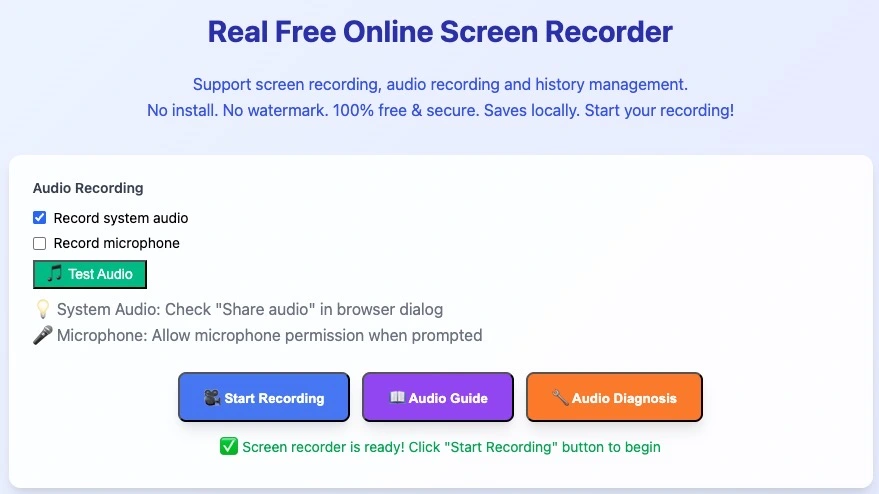
Follow the 3 Simple Steps:
Step 1. Start Recording: Open our free online screen recorder, select ”record system audio”, and choose “Record an Application Window”.
Step 2. Play the Video: Go to Telegram, play your video in full screen, and select the Telegram window for the recorder to capture.
Step 3. Save Your Video: Click “Stop” when the video ends. Download the MP4 file directly to your computer.
If you find this tool useful, don’t forget to share it with your friends.
Method 2: Download Private Telegram via Telegram desktop client
You can also save restricted Telegram videos directly to your computer. Ensure you have the Telegram desktop client installed (download it from telegram.org if not already in use).
Follow these steps to download private channel videos on Windows 10/11:
Step 1. Retrieve the Video via Bot:
Use a Telegram bot (e.g., the method outlined in previous steps) to generate a downloadable version of the restricted video.
Step 2. Save the Video Locally:
- Right-click the video file in your Telegram chat or bot interface.
- Select “Save As…” from the context menu.
Step 3. Choose a Secure Download Location:
Specify a folder on your PC (e.g., Documents, Videos) to store the file safely.
Method 3. Download Private Videos a Third-party Video Download Tool
For a seamless experience, Elwayshare’s free video downloader for pc – Elwayshare Video Downloader stands out as a Telegram premium video downloader with features like:
- Support for MP4, MPEG, and OGG formats.
- Batch downloads for entire media libraries.
- No API or login requirements.
This tool also works for top soap2day alternatives and download Video from Facebook if needed.
Step 1: Input URL
Enter the target webpage URL into the URL field and click Open URL to load the content. Alternatively, use the Paste URL button for direct clipboard insertion.
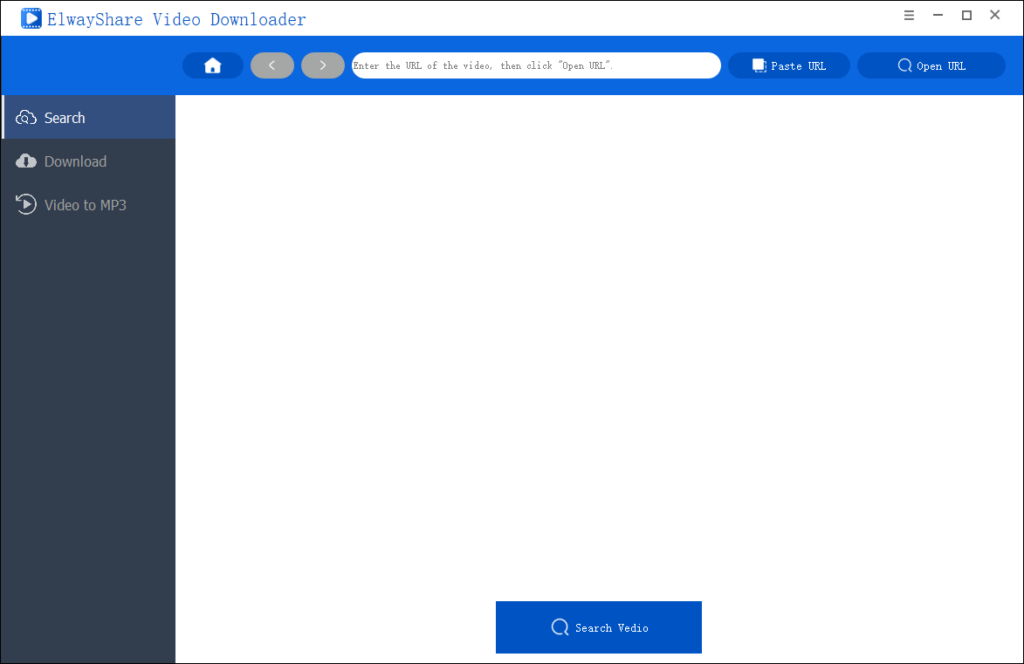
Step 2: Select Media Format
Click Search Video to activate media detection. Choose Video (with visual and audio) or Audio (audio-only format), specify the save directory, and confirm by clicking Download.
Step 3: Verify Completion
Upon successful download, navigate to the Finished tab to access your file. Verify metadata (e.g., format, size) as needed.
Download Private Telegram Videos on Mobile Devices (iOS/Android)
Method 1: Use a Telegram Bot for Direct Downloads
First, consider using the Telegram bot for this task. Telegram bots are lightweight applications integrated into the Telegram platform, designed to automate services or assist with specific actions.
Follow these steps to proceed:
Step 1. Locate the Target Video: navigate to the private video you wish to download within Telegram.
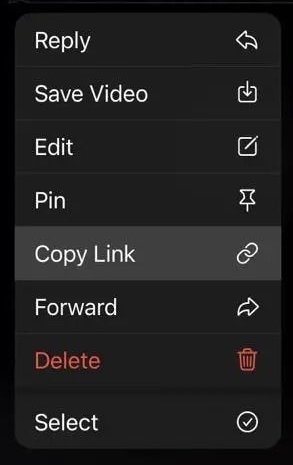
Step 2. Copy the Video Link: long-press the video to open the context menu, then select “Copy Link”.
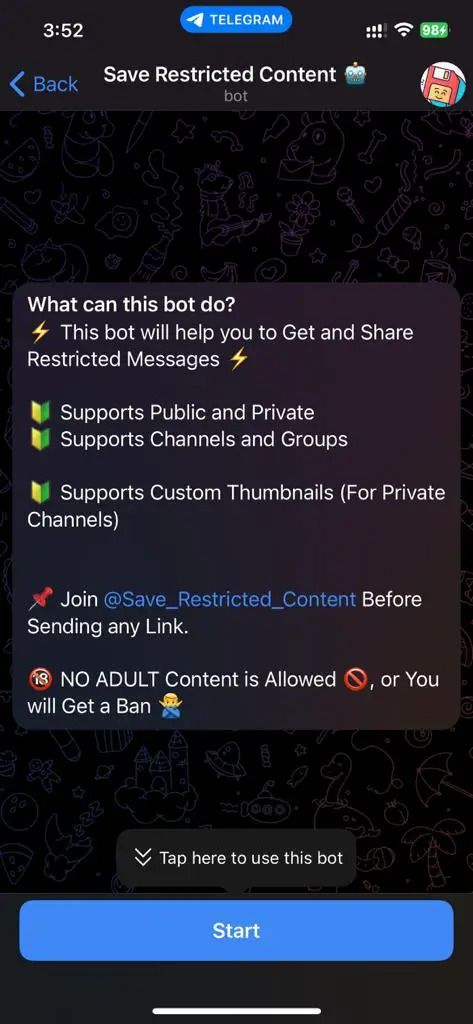
Step 3. Access the SaveRestrict Bot: Open the following Telegram bot directly: https://t.me/Save_Restrict_bot.
Step 4. Initialize the Bot: Tap the “Start” button to activate the bot and begin the process.
Step 5. Submit the Video Link: Paste the copied link into the chat and press “Send”.
Step 6. Download the Video: Within seconds, the bot will provide the downloadable video file. Long-press the video and select “Save to Gallery” or your preferred storage location.
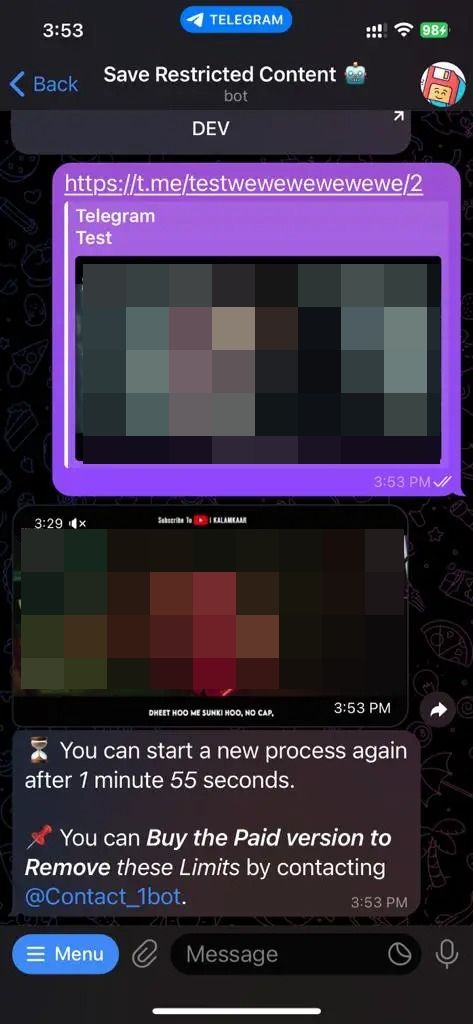
Note: While this method is generally reliable, occasional backend updates to Telegram may temporarily disrupt functionality. If the bot fails to respond, retry the steps or check for bot updates.
Method 2: Access Cached Files via File Manager
Way 1: Android users can retrieve cached Telegram videos:
Step 1. Open your file manager and navigate to /Android/data/org.telegram.messenger/files/.
Step 2. Look for media folders sorted by date or channel name.
Step 3. Copy the video files to your device gallery.
iOS users need jailbreak access for similar steps, which is not recommended due to security risks.
Way 2: If the way 1 doesn’t work, try this way below:
You can use Files by Marc Apps to access restricted Telegram videos. Follow these steps:
Step 1. Download the Video to Local Storage:
- Open the Telegram channel containing the restricted video.
- Play the video to trigger its automatic download to your device.
Step 2. Install Files by Marc Apps:
- Download and install the app from the Google Play Store.
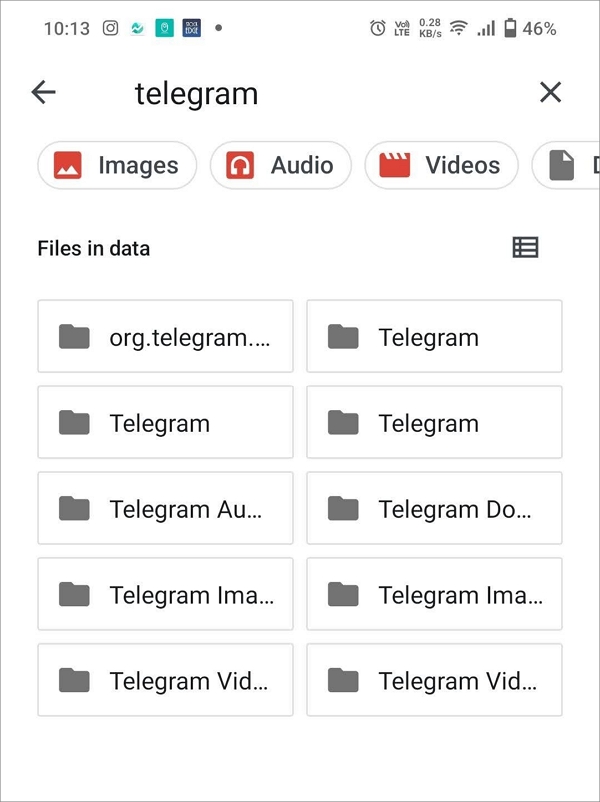
Step 3. Navigate to Telegram’s Storage Path:
- Open the app and go to Internal Storage > Android > Data.
- Scroll to locate the org.telegram.messenger (Telegram) folder and tap Files.
Step 4. Access Downloaded Videos:
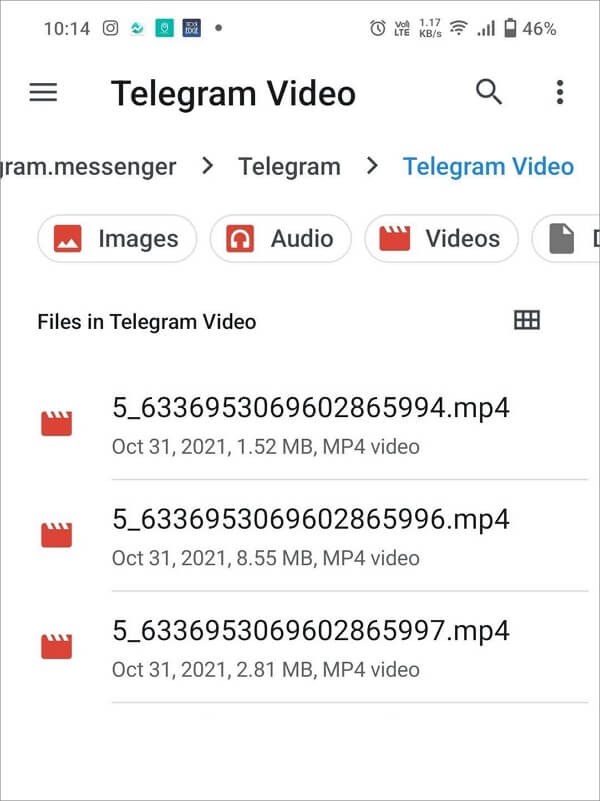
- Go to Telegram > Telegram Video — this folder contains all cached media.
Step 5. Locate the Target File:
- Scroll to the bottom of the list to find recently downloaded files.
- Note: Files may lack clear names – tap each to preview and identify the correct video.
Step 6. Move and Share the Video:
- Long-press the file to copy or move it to a public folder (e.g., Downloads).
- Once relocated, share it via your preferred platform.
Important:
- This method relies on Telegram’s temporary caching system. If the video expires or is deleted from the channel, it may no longer be accessible.
- Ensure app permissions for Files by Marc Apps are enabled to access the Android/Data directory.
Conclusion
Navigating the download restrictions in private Telegram channels requires a bit of ingenuity. As we’ve explored, methods range from using the official Telegram desktop client when possible, to employing handy bots or accessing cached files. However, for a universally applicable, secure, and free solution, a free online screen recorder stands out as the most versatile Telegram video downloader for most users. It requires no software installation, works directly in your browser, and effectively bypasses all download restrictions set by channel administrators.
Regardless of the method you choose, it is paramount to prioritize your digital security and act responsibly. Always use these techniques for personal, offline access to content you have legitimate rights to view, and strictly respect copyright laws and the privacy of the channel creators. By selecting the right tool for your needs and using it ethically, you can effortlessly save those important private Telegram videos for offline enjoyment.
FAQs
Can Telegram Access Private Channels?
Telegram, as a platform, maintains a high level of privacy and end-to-end encryption for secret chats. For private channels and cloud chats, Telegram holds the encryption keys necessary to transmit data but has a strong policy of not sharing user data with third parties, including governments, unless required by a court order in a credible jurisdiction. However, it’s always best to assume that any content you do not control entirely could potentially be accessed.
Is Telegram Safe for Sharing Private Videos?
Telegram is generally considered safe due to its encryption and privacy features. For the highest level of security, use “Secret Chats” which are end-to-end encrypted and leave no trace on Telegram’s servers. Videos shared in channels or cloud chats are secure but rely on client-server/server-client encryption.
How Do I Find Downloaded Files in Telegram?
On mobile, downloaded media is typically saved in your device’s “Telegram” folder (e.g., Internal Storage/Telegram/Telegram Video). On Telegram Desktop, you can right-click a video and select “Show in folder” to locate it directly.
Why is the ‘Save to Gallery’ option missing for some videos?
This is a deliberate setting chosen by the channel administrator. To prevent easy redistribution of their content, admins can disable the ability for members to forward or save media from the channel.
Is it legal to download videos from a private Telegram channel?
This is a critical consideration. While a method may be technically possible, it is essential to respect copyright and intellectual property laws. Downloading content for personal, offline viewing is often a gray area, but redistributing or using the content commercially without permission is almost always illegal. Always ensure you have the right to download and use the content.
The screen recorder method seems simple. Does it affect video quality?
A good online screen recorder allows you to select the recording quality (e.g., 1080p). While there might be a minimal loss compared to a direct source file, recording at the highest quality setting will produce a very viewable video that is virtually indistinguishable to the average eye.
Are there any risks in using third-party downloader apps or bots?
Yes. Unofficial apps and bots can pose security risks, such as containing malware or attempting to steal your Telegram credentials (like your session ID). Always research the tool’s reputation extensively, download from official websites, and be wary of granting any bot or app unnecessary permissions to your account.
Disclaimer:
The methods outlined in this article are provided for educational and informational purposes only. We do not condone any actions that violate Telegram’s Terms of Service, copyright laws, or privacy rights. Use third-party tools and techniques at your own risk, and ensure you have proper authorization before accessing or downloading any content. We assume no responsibility for any consequences resulting from the use of these methods.